
Updated
Short answer
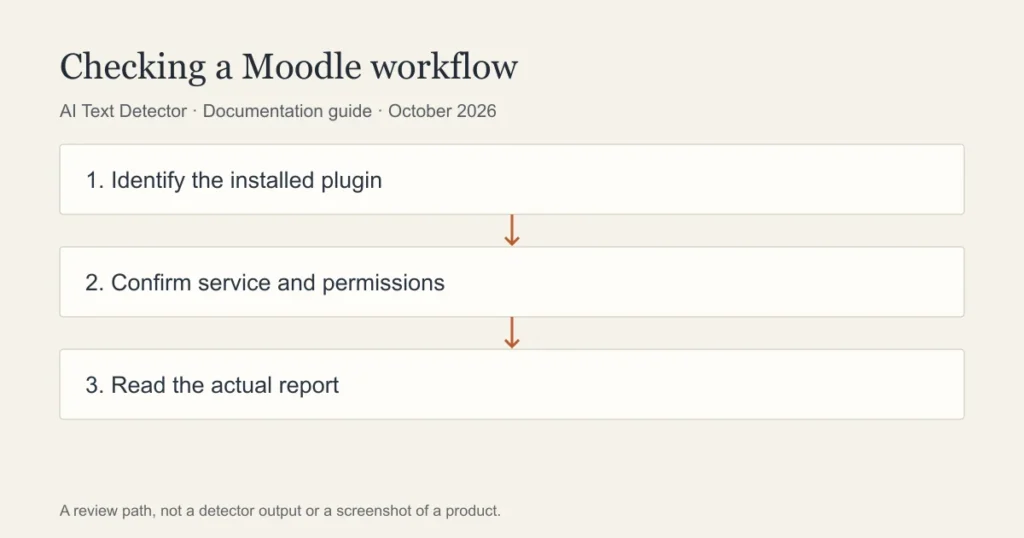
Do not infer AI detection from the Moodle name alone. A Moodle assignment can be connected to an institution’s plagiarism or assessment service, and the resulting report depends on that service and its settings. Ask which plugin produced the report before describing it as an AI check.
| Component to identify | What to verify | Who can confirm |
|---|---|---|
| Core assignment | Submission type and enabled workflow | Course teacher or administrator |
| Plagiarism plugin | Installed component and external provider | Site administrator |
| Turnitin-connected workflow | Licensed features and reporting availability | Institutional Turnitin administrator |
| Other external service | Whether its report includes AI assessment | Service owner and vendor documentation |
| Student report view | Role permissions and release settings | Teacher using an authorised student view |
Start with the service behind the assignment
Moodle is a learning environment in which institutions can configure assessment workflows. A student may encounter a report through an assignment without knowing the vendor that generated it. That makes product identification the first step in answering an AI-detection question.
The Moodle documentation we could inspect describes a plagiarism-plugin interface. That establishes a mechanism for integrations; it does not establish every feature of the current release or every institution’s installation. We therefore avoid a categorical claim that no Moodle deployment can perform an AI assessment.
An administrator should identify the installed component, its version, the external service it calls and the assignment settings. A teacher can then explain which output is relevant. Students should receive the report name and an explanation of the concern rather than a vague statement that Moodle detected something.
Similarity and AI-writing information need separate explanations
A similarity report identifies matching material within the sources available to the service. An AI-writing assessment classifies features of the submitted text. A teacher should not translate one label into the other or assume that both reports exist for every submission.
Open the report itself and record the name of the feature. If it identifies sources, review the relevant matches and attribution. If it identifies suspected AI writing, inspect the highlighted passage and the service’s limitations. The presence of a percentage in both interfaces does not make the measures interchangeable.
A missing report requires troubleshooting. The submission may still be processing, the feature may not be enabled, or the text may not meet the service’s requirements. An administrator should investigate the actual state. Do not present an unavailable report as confirmation that a paper was entirely human-written.
Teacher steps before discussing a concern
Check the assignment instructions and what students were told about assistance. Then retain the submitted version and the report being discussed. A later resubmission or a scan in a different service may produce a different output, so keep the original evidence available for review.
Prepare a concrete explanation. Name the passages, describe the source or report field, and explain which policy may apply. Avoid asking a student to rebut an unspecified algorithm. They should be able to understand the evidence and provide drafts, notes or a description of their process when appropriate.
If technical settings are unclear, consult the institution’s administrator before reaching a conclusion. The teacher should not have to guess which integration is active. The institution is responsible for explaining its own workflow and for following its published review process.
Student steps when a Moodle submission is questioned
Ask which service generated the concern and request the relevant report excerpt. Save your submission receipt, working files and source notes. Explain where the document was drafted and whether any permitted tools were used. Be specific about the work rather than offering a blanket claim about what Moodle can see.
If you drafted outside Moodle and pasted the finished work into a submission field, say so. That describes a workflow, not proof of misconduct. Earlier versions may help explain how your argument developed, subject to the institution’s process and the privacy of other contributors.
Do not repeatedly resubmit or upload the document to unrelated services without guidance. Each action can create a new version or share material with another provider. Follow the course’s resubmission and data-handling instructions.
Can a free checker predict the school report?
No public detector can open your institution’s private report simply because you submit the same words. Walter Writes offers a free detector, but that output would remain a separate estimate. It does not establish which Moodle plugin is active or how a school interprets a submission.
This article is an administrator-oriented checklist, not a completed tour of a current Moodle installation. We have not inspected an authorised course or validated the menu sequence for a particular release. Use the guide for the installed release and ask the administrator which external services are enabled for the actual assignment.
The safest conclusion is the narrow one supported by the evidence: identify the integration, identify the report and review the writing. A platform name alone is not a finding about authorship.
Frequently asked questions
Which AI detector does Moodle use?
There is no single answer for every installation. Ask the school which plugin or external service is enabled for the assignment. Record the service and feature name rather than assuming that all Moodle courses use the same detector.
Can teachers see an AI score in Moodle?
That depends on the connected service, licence, assignment settings and role permissions. An administrator should verify the actual instructor view. A similarity score should not be relabelled as an AI score.
Can I see the same report as my teacher?
Student access may differ from instructor access. Ask for the relevant report and the institution’s review procedure. A consumer detector cannot unlock a private institutional report.
Sources
Choose the relevant next step
For the service and review process behind the assignment, consult Turnitin reports inside learning platforms, the learning-platform integration guide, and a teacher review workflow. Each guide separates documented features from an estimate or assumption about a writer.