
Updated
Short answer
A Google Classroom originality report checks for matching material; a match is not an AI-authorship verdict. The report can help a teacher examine sources and attribution. To understand an AI concern in a particular class, identify the separate service, report and policy involved rather than assuming every Classroom submission receives an AI score.
| Report element | Question it helps answer | What it cannot establish |
|---|---|---|
| Flagged passage | Which wording deserves a closer source check? | Who composed the passage |
| Matching source | Where might similar wording appear? | Whether the writer intentionally copied it |
| Citation context | Is attribution present and appropriate? | That the entire assignment meets every policy |
| School matches, when enabled | Is there a relevant institutional comparison? | Universal access to all student work |
| Report availability | Was this feature enabled for the assignment? | That another AI service was also run |
What is an originality report checking?
Google describes originality reports as a way to compare student work with material available to the service and identify passages that may need citation. That is a source-matching task. AI detection instead estimates whether a pattern of language resembles machine-generated writing. The two tasks can raise different questions about the same document.
A properly attributed quotation can match another source. A newly generated passage may have no matching source at all. Conversely, a human writer may reproduce wording without attribution. Read the underlying passage before deciding what a report means. A percentage is less informative than the text and the sources behind it.
The available comparisons depend on the institution and its settings. Google documents school matches as a separate capability. Do not infer that a teacher can search every other student submission simply because an originality button appears in the interface. Ask what comparison sources are enabled for the assignment.
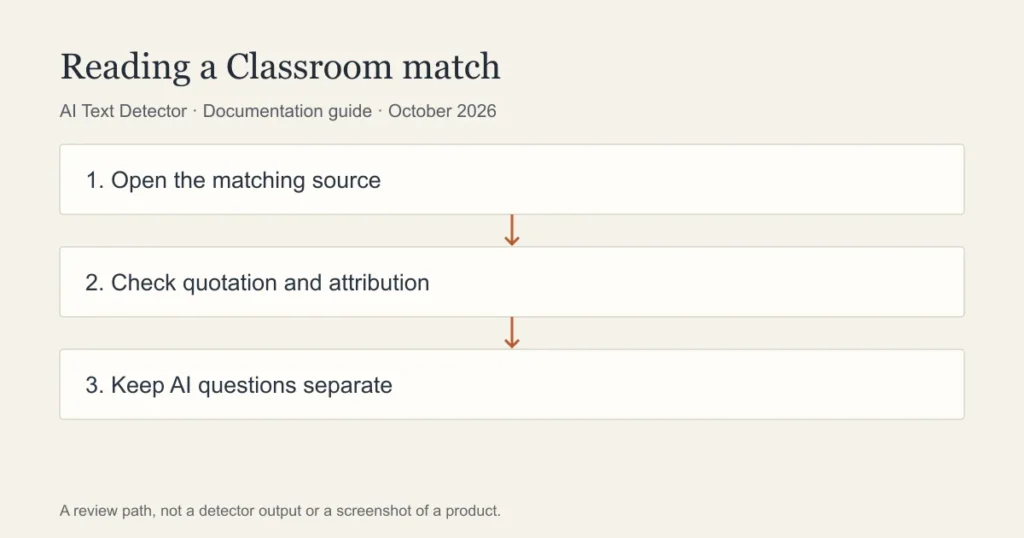
A teacher workflow for a flagged passage
Start with the assignment instructions. If the task permits quotation, close reading, formulaic language or use of a provided template, those features affect interpretation. Open the matching source and compare the actual wording. A source title alone does not tell you whether the student paraphrased properly or whether the match is a common phrase.
Next, examine attribution. Is the passage quoted? Does the citation identify the source used? Is a close paraphrase being presented as an original explanation? These are questions about writing and sourcing that a teacher can discuss directly. They should not be replaced with an unsupported statement that the text was generated by AI.
If a separate AI report exists, label it separately in your notes. Record the service and the passages it identified. Explain how that information relates to the course policy and give the student an opportunity to respond. A fair explanation describes the evidence without treating uncertainty as a confession.
What should a student do before submitting?
Keep your notes and the sources you actually read. Check that quotations, close paraphrases and borrowed ideas have appropriate attribution. If an originality report is available to you, use it to inspect matches rather than trying to force a particular percentage. Ask your teacher about unfamiliar matches or a source you cannot open.
A draft can contain your own earlier writing. Whether reusing that writing is allowed depends on the assignment, so ask rather than assuming a match proves misconduct or that self-authorship removes every concern. The relevant question is what the current task permits and what you have represented as new work.
Do not upload a classmate’s work or confidential feedback to a public checker. A service being free does not establish permission to share a document. Check school policy and remove identifying details when an authorised review can be performed without them.
Does Google Docs version history prove the writing is human?
Version history can help explain how a document developed. Google documents how to inspect earlier versions and changes. A visible revision sequence is process evidence, but it is not an authorship certificate. A passage may have been drafted in another application, and a document may contain work from several people.
Use history to discuss concrete changes: when an outline became a draft, how a source was incorporated, or why a paragraph was revised. Do not equate a single paste with academic misconduct. Equally, many small edits do not automatically establish compliance with an AI policy. The writer’s explanation and the assignment rules still matter.
A useful review asks the student to explain a substantive decision in the work. How did they choose the evidence? Why did the conclusion change? Those questions concern understanding and development. They are more informative than demanding that a student reconstruct every keystroke.
Where does a second detector fit?
Walter Writes offers a free detector, but its output would be a separate estimate. It is not a Google originality report and cannot reveal a teacher’s private report. A second check may suggest a passage to review; it cannot establish what happened inside an institutional account.
This guide maps published features to a review process. It does not report a completed Classroom account walkthrough. School-specific availability, menu labels and permissions can differ. Follow the workflow documented for your institution and ask its administrator about an unavailable report.
A match is a prompt to inspect sources, not proof of AI authorship. Keep that distinction in the feedback given to a writer, particularly when a report is being used in a consequential decision.
Frequently asked questions
Does Google Classroom automatically detect ChatGPT?
An originality report should not be described as a ChatGPT detector. Identify any separate AI service used by the school and ask which report supports a concern. Classroom access alone does not establish that such a service ran on a submission.
Can a student see an originality report?
Availability depends on the assignment and the school’s enabled features. Follow the student workflow documented by Google and ask the teacher if the report is unavailable. A missing button does not establish whether a separate instructor review occurred.
Is a low similarity result proof of original writing?
No. Source matching cannot establish the complete writing process. Review citations, the argument and the assignment policy. A low result does not validate AI use, and a match does not by itself prove wrongdoing.
Sources
- Google Classroom originality reports
- Google Classroom student originality report
- Google school matches
- Google Docs version history
Choose the relevant next step
For document history, teacher review and separate checking access, consult Google Docs version history, a teacher review workflow, and free detector access and limits. Each guide separates documented features from an estimate or assumption about a writer.