
Updated
Short answer
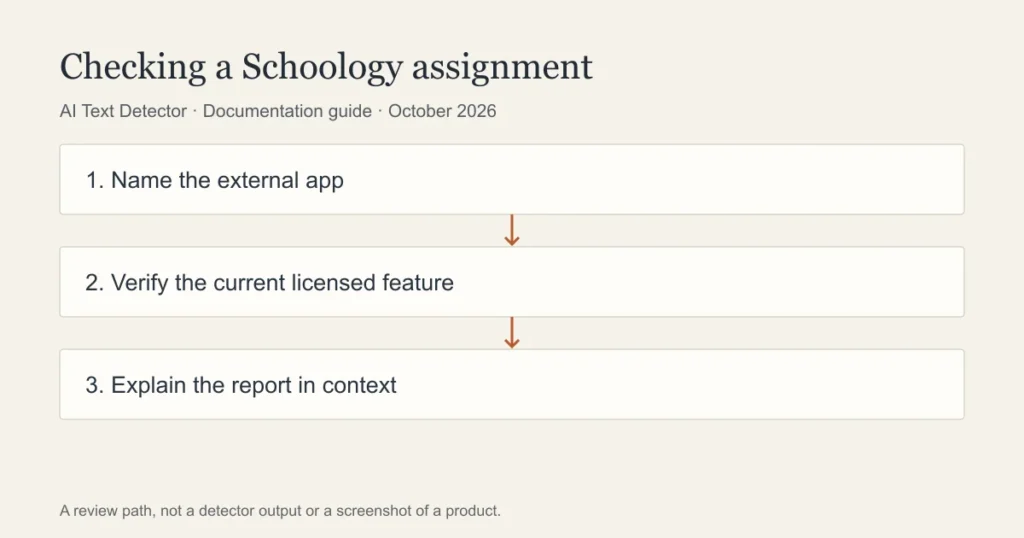
Schoology can connect to assessment services, including the Turnitin LTI app documented by PowerSchool. That does not establish an AI report for every assignment. Check the actual app, licence and report feature rather than treating the Schoology name as evidence that AI detection ran.
| Item | Question to ask | Evidence to retain |
|---|---|---|
| Assignment app | Which service receives this submission? | Assignment instructions and app name |
| Institutional setup | Is the documented integration licensed and configured? | Administrator confirmation |
| Report feature | Is this similarity, grading or AI-writing information? | Named report and relevant passage |
| Student access | Which results can the student view? | Actual role-specific feedback view |
| Processing status | Did the report complete for this submission? | Receipt, report state and timestamp |
What the PowerSchool documentation establishes
PowerSchool documents a Turnitin LTI app workflow for Schoology. The guide describes an institutional integration, not a universal AI detector applied to every piece of student writing. It is important to keep the documented integration separate from a claim about a particular report feature.
The documentation names requirements for the app workflow and describes originality-report functionality. Historical references to an originality report should not be silently rewritten as confirmation of current AI-writing analysis. A teacher or administrator must verify the licensed feature in the account actually being used.
This is why a categorical answer based only on the platform name is unreliable. Two schools can use the same learning environment while enabling different external services. Even within a school, assignments can follow different submission routes.
For teachers: explain the report you actually have
Open the submitted version and identify the report type. If the report shows source matches, investigate attribution and the matched wording. If a separately available feature assesses AI writing, read its explanation and limitations. Do not turn an originality label into an authorship conclusion.
Check the assignment’s policy before discussing a concern. Students need to know which assistance was permitted and which representation of authorship is being questioned. A clear explanation names the passages and the relevant rule rather than relying on a dashboard label.
If the service or permissions are unclear, consult the institutional administrator. The teacher should not have to infer the reporting workflow from an old tutorial. A current account check is necessary before publishing instructions that promise a particular button or report.
For students: understand the submission route
Read the assignment instructions and keep the submission receipt. If the task opens an external app, record its name. That helps distinguish the learning environment from the service that processes the work. It also gives support staff a clearer starting point if a report is delayed or missing.
If a concern is raised, ask for the relevant report excerpt and an explanation of the policy. Keep your drafts, planning notes and source records. Explain any permitted tools you used and the decisions you made in developing the work.
Do not assume that a missing student-facing report means no review occurred. Conversely, do not assume a service ran merely because the school has a licence. Ask about the specific assignment and submitted version.
Similarity, AI assessment and writing history are different evidence
Similarity concerns overlap with other material. AI assessment concerns patterns in the text. Writing history concerns how a document changed. Each can inform a review, but none should be stretched beyond what it records. A match can be properly cited; a sequence of edits can include outside assistance.
The institution should explain how the evidence supports its concern and allow a response. A student should not be required to disprove a report that has not been identified. Teachers should preserve the original report rather than repeatedly rescanning until a preferred result appears.
Context includes the task, source material, language background and any accommodations. Those factors do not automatically resolve a case, but they matter when a tool’s stylistic signal is being interpreted. A report should support a fair process rather than replace it.
What a public detector can add
Walter Writes offers a free detector that can provide a separate estimate. It cannot reveal a private Schoology or Turnitin report. Before uploading student work, confirm that the external service is permitted and that the document can be shared under the school’s rules.
A second result can identify a passage for closer reading. It cannot establish which integration the school enabled or settle a disagreement about authorship. The useful next step is an explanation of the writing and sources, not a contest between percentages.
This page is a documentation-based checklist. We have not completed an authorised Schoology walkthrough or confirmed every current app capability. The report name and assignment setup matter more than the learning platform’s name.
Frequently asked questions
Does every Schoology assignment use Turnitin?
No universal workflow should be assumed. Check the assignment app and your institution’s configuration. The presence of a documented integration does not prove it is enabled for a particular submission.
Does the Turnitin LTI guide prove AI detection is available?
An integration guide is not enough to establish every current feature. Verify the licensed product, reporting feature and role permissions with the institution. Historical originality-report terminology should not be treated as AI-report confirmation.
Can a student check the same result independently?
A public checker cannot access the institutional report. Ask the teacher for the relevant information and preserve your writing records. Follow the school’s process if the concern affects a grade or misconduct decision.
Sources
Choose the relevant next step
For the connected service and a fair classroom review, consult Turnitin reports inside learning platforms, the learning-platform integration guide, and the educator guide. Each guide separates documented features from an estimate or assumption about a writer.