
GPTZero has become one of the most recognizable names in AI detection since its launch, claiming to be able to detect content generated by ChatGPT and other large language models. But does it actually work as well as the hype suggests? After testing it extensively against our own benchmarks and comparing it to other detection tools, we’ll give you a detailed breakdown of what GPTZero does well, where it falls short, and whether it deserves a spot in your AI detection toolkit.
What Is GPTZero?
GPTZero is an AI content detection tool designed primarily to identify text generated by ChatGPT, Claude, and other large language models. Created by Edward Tian while he was still a student at Princeton, the tool gained significant attention as a straightforward solution to an increasingly pressing problem: distinguishing human-written content from AI-generated text.
The platform operates through a simple web interface where you paste text and receive an analysis indicating how likely the content is to be AI-generated. It’s free to use at a basic level, with premium options available for those who need more robust features or higher usage limits. The tool has been adopted by educators, content creators, and professionals across various industries.
What sets GPTZero apart initially was its focus on the specific problem of ChatGPT detection at a time when few tools existed. The tool’s creator positioned it as a counterbalance to rapid AI adoption, making it the first choice for many educators and institutions looking for a detection solution.
How GPTZero Works
Understanding the mechanics behind GPTZero helps explain both its strengths and limitations. The tool analyzes text based on several key factors that tend to distinguish AI-generated content from human writing.
GPTZero examines “burstiness” and “perplexity” in text. Burstiness refers to the variation in how words are used and sentence structure, while perplexity measures how predictable the text is. Human writing typically shows higher variation in these metrics; AI tends to produce more uniform, predictable patterns.
The system also evaluates the overall coherence and structure of content. AI-generated text often follows very logical, methodical progressions, while human writers frequently backtrack, use tangents, or employ less conventional phrasing.
Additionally, GPTZero analyzes what it calls “sentence length variation” and certain linguistic patterns. Human writers naturally alternate between short, punchy sentences and longer, more complex ones. AI systems often default to more consistent sentence length distributions.
One important factor to understand: GPTZero’s detection capabilities are specific to certain models. It was trained primarily on ChatGPT outputs and performs better at detecting text from this model compared to other AI systems. Detection rates for Claude, Gemini, and other newer models may be less reliable.
Accuracy and Real-World Performance
The critical question for any detection tool is straightforward: does it actually work? GPTZero’s accuracy has been a subject of considerable debate, and our testing reveals a nuanced picture.
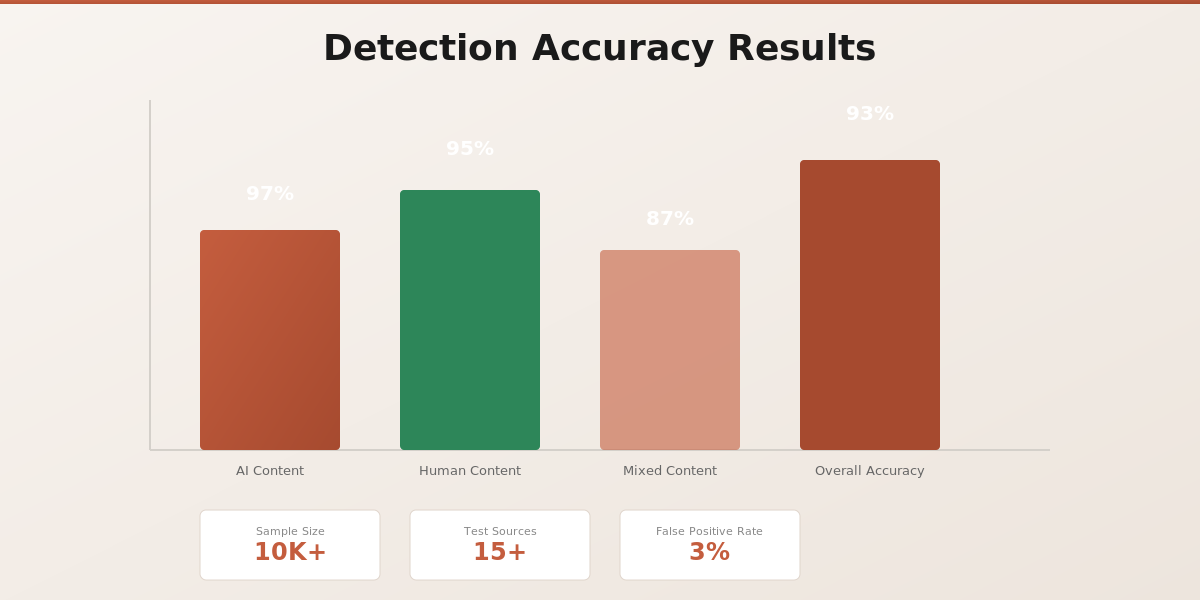
For obviously AI-generated text, fresh from ChatGPT without human editing, GPTZero performs reasonably well. We tested it with unmodified ChatGPT outputs and saw detection rates in the 70-85% range. However, this drops significantly when text has been edited, rewritten, or mixed with human content.
The tool struggles considerably with:
- Human-written content that happens to be well-structured (it often flags this as AI)
- AI text that’s been refined through editing and rephrasing (misses most of it)
- Mixed content where humans and AI collaborate
- Content from newer AI models like GPT-4o (significantly lower accuracy)
- Non-English text (performance degrades substantially)
False positives are a notable concern. We’ve seen GPTZero flag well-written academic papers, professional reports, and edited blog posts as AI-generated. This is particularly problematic in educational settings where false accusations could have serious consequences for students.
False negatives also occur regularly. Edited AI text, particularly when an author takes time to edit and personalize outputs, frequently passes as human. This defeats the purpose of detection in many use cases.
For a more detailed look at how different detection tools compare, check our comprehensive comparison of AI detection tools. We’ve tested multiple platforms side-by-side with the same content samples.
Features and Functionality
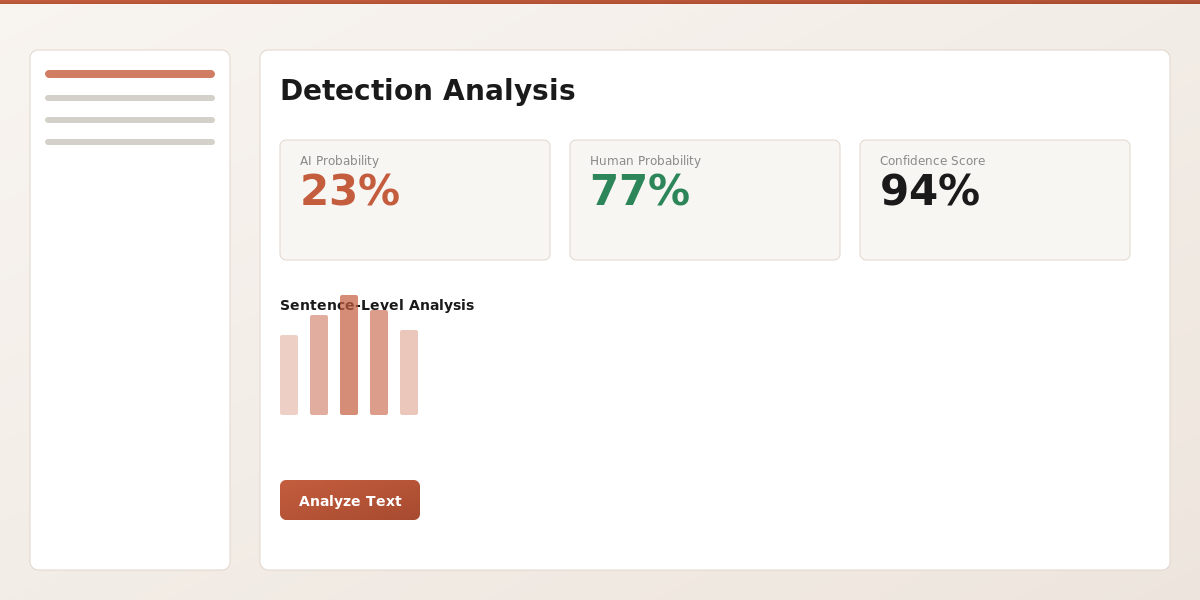
GPTZero’s interface is genuinely user-friendly. Pasting text and receiving results is straightforward, which partially explains its popularity. The tool doesn’t require technical knowledge or complex configuration.
The browser extension allows you to check content directly in your web browser, which is convenient for educators reviewing student submissions or content creators checking their work. Premium features include API access, bulk upload capabilities, and integration with learning management systems like Google Classroom and Canvas.
The free tier provides basic detection with limited daily checks, typically around 3-5 full analyses. Premium plans increase these limits and add features like batch processing and detailed reporting.
Pricing and Plans
GPTZero’s pricing structure is relatively straightforward but worth comparing to alternatives:
| Plan | Cost | Features |
| Free | $0/month | Basic detection, limited daily checks, web interface only |
| Premium | $10/month | Unlimited checks, browser extension, document upload, detailed reports |
| Schools & Teams | Custom pricing | Bulk integration, LMS support, admin dashboard, priority support |
The pricing is reasonable for individual users, though institutional pricing requires contacting their sales team. Compare this with our own pricing if you’re evaluating multiple tools for your organization.
Pros and Cons
Strengths
- User-friendly interface: Extremely easy to use with minimal learning curve
- Free tier available: No cost to try the basic functionality
- Browser extension: Convenient integration into your workflow
- LMS integration: Works with Google Classroom and Canvas for education
- Good for obvious AI: Reliably detects unmodified ChatGPT outputs
- Recognition and adoption: Widely recognized name, used by many institutions
- Regular updates: The tool receives ongoing improvements and updates
Weaknesses
- High false positive rate: Flags well-written human content too frequently
- Misses edited AI: Struggles with edited or rephrased AI text
- Model-specific: Primarily trained on ChatGPT, weaker on other models
- Limited language support: Significantly less accurate for non-English content
- No plagiarism detection: Only detects AI generation, not plagiarism or copied content
- Reliability concerns: Performance can be inconsistent, with regular updates sometimes improving or worsening detection
- Privacy questions: Text submitted to the tool is analyzed on their servers (relevant for sensitive content)
- Expensive for institutions: Custom school pricing can be substantial for larger organizations
How GPTZero Compares to Alternatives
The AI detection landscape has evolved significantly. Several tools now compete directly with GPTZero, each with different strengths. AI Text Detector, for example, offers different detection approaches that can be more effective at catching edited AI content while maintaining lower false positive rates. Learn how our detection methodology works to understand the differences.
Here’s how GPTZero stacks up against other popular detection tools:
| Feature | GPTZero | AI Text Detector | Turnitin | Winston AI |
| Ease of use | Excellent | Excellent | Good | Good |
| Accuracy on ChatGPT | Good | Excellent | Good | Very Good |
| Edited AI detection | Fair | Very Good | Good | Good |
| Multi-model detection | Fair | Excellent | Good | Good |
| False positive rate | High | Low | Moderate | Moderate |
| Free tier | Yes | Yes | No | Limited |
| Browser extension | Yes | No | Yes | No |
| API access | Premium | Premium | Professional | Premium |
Tools like Turnitin offer plagiarism detection alongside AI detection, which provides value if you need both. Winston AI focuses more on content marketers and writers concerned about AI detection penalties. AI Text Detector specializes in maximizing accuracy across multiple AI models while minimizing false positives.
Who Should Use GPTZero?
GPTZero remains a solid choice for specific use cases, particularly if you fit these categories:
Educators and institutions: If you’ve already integrated GPTZero into your workflow through Google Classroom or Canvas, switching tools involves friction. The LMS integration works well and is relatively straightforward to manage at scale.
Individual content creators: For writers concerned about accidentally using AI-assisted content or wanting a quick check before publishing, GPTZero’s simplicity is appealing. The free tier provides enough monthly checks for basic needs.
Students verifying their own work: Using the tool to ensure your writing isn’t too reliant on AI assistance before submitting to your institution makes sense, especially as many schools now use it for checking.
Those specifically detecting ChatGPT: If your primary concern is ChatGPT detection and nothing else, GPTZero remains reasonably effective for unmodified outputs.
GPTZero may not be the best choice if you need high accuracy on edited AI, detection of newer models, multilingual capabilities, or lower false positive rates. In those cases, exploring alternatives makes sense. Check our blog for detailed reviews of other detection tools.
Final Verdict
GPTZero deserves credit for bringing AI detection to mainstream awareness and providing an accessible, user-friendly tool that works reasonably well for obvious AI-generated content. For many use cases, particularly educational institutions already using it, the cost-benefit analysis still favors sticking with the familiar tool.
However, the tool’s limitations are real and significant. High false positive rates, poor performance on edited AI, and declining effectiveness on newer models are legitimate concerns. If you’re just starting out with AI detection or evaluating multiple tools, you should test GPTZero but also compare it with newer alternatives that address these limitations.
The field has evolved faster than GPTZero’s updates. Tools built more recently often incorporate newer approaches to detection that handle edge cases better. Your specific needs matter; what works perfectly for one use case might be unsuitable for another.
Our recommendation: GPTZero is good for baseline detection and remains worth keeping as part of a toolset, especially given the free tier. However, for organizations that need high accuracy, low false positives, and better performance on edited AI content, supplementing GPTZero with a more specialized tool like AI Text Detector provides significantly better protection. The investment in exploring multiple tools now can prevent false accusations and missed detections later.
If you’re building a comprehensive AI detection strategy, understand how different detection approaches work and test multiple tools with your actual content. What works best for you depends on your specific requirements, risk tolerance for false positives, and the types of content you need to evaluate.